

Two teams.
One humanity.
Your choice.
Drive for your team. Take the gunner seats. Keep supplies flowing. Decide when rivals need to become allies.
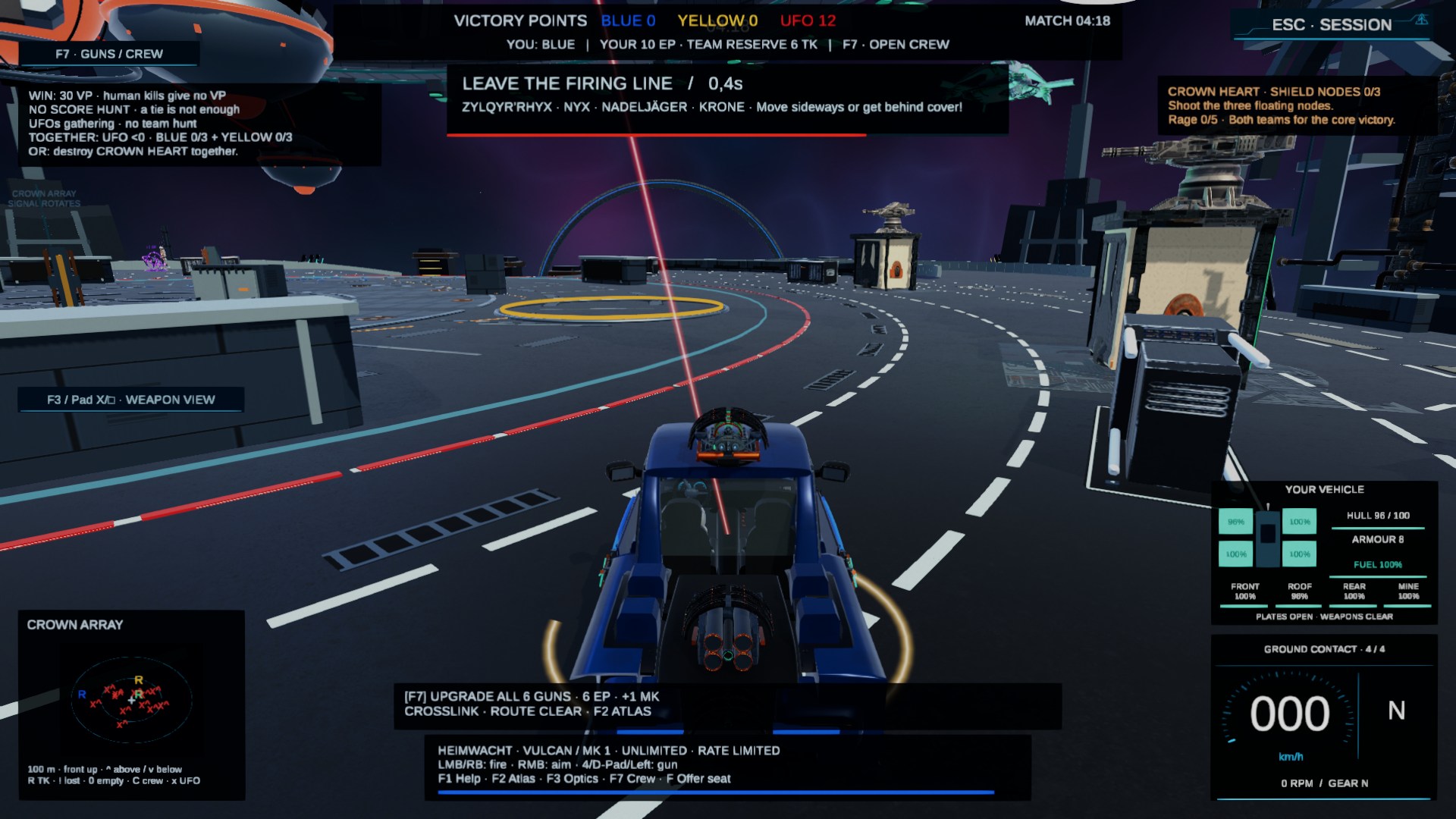
Hero image: Higgsfield concept art, not a gameplay capture. See below for real images from the current build.
Chase points.
Don’t lose sight of humanity.
TriLeague UFO Wars combines vehicle combat, crewed weapon stations and a shared alien threat. Blue and Yellow compete for the lead while the red UFO swarm puts both under pressure.
Choose your route.
Open firing lanes, elevated routes and cover shape when you can attack and when you need to fall back.
Strengthen your team.
Secure resources, support damaged vehicles, salvage wrecks and offer stranded pilots an open gunner seat. There is more to contribute than eliminations.
Recognize the greater threat.
Respond to target warnings and pressure from the UFOs. Alongside each team’s score objective, humanity has shared goals, including the fight against the Crown Heart.
You drive.
Your crew has your back.
All six weapons are part of the arsenal. As the driver, press 4 to cycle weapon modes; press F7 to open the arsenal, seats and crew overview. The driver cannot take over a gunner seat while it is occupied.
| Station | Weapons | Your choice |
|---|---|---|
| Front | VULCAN | Unlimited basic weapon with a limited rate of fire. You can still fight without special ammunition. |
| Roof | IMPULS / RAIL | Direct fire or a precise heavy shot; both use ammunition. |
| Rear | HYDRA / IRIS | Rocket or homing rocket. IRIS needs a valid target and a clear line of sight; it cannot track through every wall. |
| Mine launcher | ANKERFALLE | Put pursuers under pressure and tactically secure choke points. |
Weapon levels up to MK 10 come from contribution, crew and purchased match upgrades. Match upgrades cost EP. Paint and other designs are separate from combat advantages; the current development status does not promise that real-money purchases are available.
A vehicle alone is not a team.
In LIGHTHAVEN, an eligible host can open their crew. Join through CONCORD to support them at an open gunner seat. The host remains the driver; you operate the weapon.
If your vehicle is destroyed, the Lifeline may open a limited rescue route. Press F to try boarding an eligible host who is moving slowly and has an open crew seat.
Defense comes at a cost.
At an accessible supply station, stop and press E to take its unoccupied gun. Its basic ammunition is unlimited, but its rate of fire is limited. Your parked vehicle remains vulnerable.
Press E to return. If the turret is destroyed or the round ends, the return logic takes over. Your team’s stations and shared stations have different access rules.
What you destroy
may be missed later.
Supplies and cover are part of every decision. Damaged resources and destroyed guns affect the options available to you. Activated extensions change which routes can be reached. Decorative objects are not all destructible.
The sky escalates too.
Surveillance, the approaching fleet and stellar collapse shape the round. Victory, shared success and UFO takeover each have a different ending. You can skip the brief world view.
Your contribution remains visible.
The debrief shows tracked player contributions, rescues, salvage, UFO damage and the state of the arena. F6 still opens team/all text radio. You can save the summary and PNG locally or share them yourself.
View the current results screen

Get in. Get oriented.
Get better together.
Default keyboard and mouse controls for the current development build. Your state, occupied seat and in-game prompts determine what you can do.
- Start a round: In the development build, choose LOCAL PLAYTEST, ready up in the lobby and wait for the round to start.
- Drive: Use WASD to move; Space applies the handbrake. Press V to switch between close, overview and cockpit views.
- Aim and fire: Hold the right mouse button and move the mouse to aim; left mouse button fires. Press 4 to select the next weapon.
- Find your way and resupply: F2 opens the atlas and rendezvous points. F7 opens the arsenal, crew and upgrades. Check costs in the HUD.
- Stay together: open your crew, take a suitable seat or help stranded pilots. F6 opens private team or public all-player text radio.
| Action | Default key | Notes |
|---|---|---|
| Drive / Handbrake | WASD / Space | Vehicle context |
| Aim / Fire | RMB hold / LMB | Focus the game window and close menus |
| Cycle weapon | 4 | Six weapon modes; does not change crew seats |
| View / weapon sight | V / F3 | Close / overview / cockpit or weapon view |
| Help / Atlas | F1 / F2 | Locations, team rendezvous and contextual tips |
| Arsenal & Crew | F7 | Choose an open seat, manage crew access and upgrades |
| Team/all text radio | F6 | No voice chat; typing disables combat inputs |
| Lifeline board / return | F | Rescue/crew context; not a general vehicle exit |
| Supply turret | E | Stop nearby; press E again to return to your vehicle |
| Session menu | Escape | The round continues while this menu is open |
Supplies, special actions and vehicle details
| Shield / Repair / Ammo | 1 / 2 / 3 |
|---|---|
| Ally support / Team pulse | 5 / 6 |
| Donate 5 EP / Armor | 7 / 8 |
| Rescue / Salvage | R / H |
| Breach / Signature | B / G |
| Roadside / Express / Tow / Service drone | J / P / T / O |
| Boost | Shift, when available |
| Lights / Turn signals / Hazard lights / Horn | L / Q–E / X / K |
| Look around cockpit / Center view | Alt + RMB / Pos1 |
| ECHO gesture | N hold N, choose 1–6, release N |
Depending on context, actions require currency, ammunition, an open seat, suitable speed or an available cooldown. In a vehicle, E is also the right turn signal. In a gunner context, Space may fire.
Gamepad: key weapon bindings
In weapon/crew context, the right stick aims and right bumper (RB) fires. D-pad left cycles weapon modes; LB activates the shield. D-pad down/up: repair/ammo; right: ally support. Use the on-screen station buttons for seat selection and special actions.
Clear answers.
More time to play.
How do I switch to another gunner seat?
Press F7 to open the arsenal and crew, then choose an eligible open seat. Cycling weapons with 4 is a separate action. The roof and rear each have an alternate weapon. Occupied seats are locked.
Can I get out of my vehicle at any time?
There is no general free-exit action. CONCORD support, Lifeline boarding after vehicle loss and switching to a supply turret are separate actions with their own requirements. Each station view provides a way back.
How do I get better weapons?
All six weapons are already on board. During a round, MK levels progress through contribution, crew and upgrades purchased with EP, up to MK 10. Check the current level, costs and ammunition in the arsenal and HUD.
Can the entire arena be destroyed?
No. Certain resources, guns and other game objects have damage and functional states. Decorations and driving surfaces are not generally destructible.
How can I share my round?
After the results, you can copy a summary and save a PNG of the visible game screen locally. F6 text radio remains available. An optional clip buffer is local, silent and off by default. There is no automatic social upload or built-in voice chat.
Is TriLeague available now?
TriLeague UFO Wars is in development. This page describes the game and its current development status. Availability and approved purchase options will be announced separately; the guide may change with new builds.
Two teams.
One humanity.
TriLeague UFO Wars combines vehicle combat, crew-operated weapon stations and a shared alien threat. Race for your team’s score, protect resources, rescue stranded pilots and recognize when cooperation matters more than rivalry.
Quick controls: WASD to drive, Space for handbrake, hold RMB to aim and LMB to fire. Press 4 to cycle weapons, F7 for arsenal and crew, F2 for the atlas and F6 for team/all text radio. F is contextual Lifeline boarding; E operates an accessible supply turret. Neither is a universal free-exit command.
In development. Hero image is promotional concept art; the Crown and debrief images are actual development-build captures. Voice chat and automatic social uploads are not integrated.